- Role
- Copywriter, Frontend Developer, Marketing Writer
- Year
- 2024
- Client
- CLM, CRM, FSM
- Industry
- Customer Loyalty, Field Service Management, HVAC
- Team
- Skills
SmartAC.com Website
Going from B2C to B2B
Research
SmartAC had done a good job in explaining itself to the B2C market. SmartAC's early conceit was simple - make a great consumer product people love using, then success will follow. As the company grew, it was clear that competing in the huge anyone-who-has-an-AC market was going to be daunting.
Because the quality of SmartAC's sensors, apps and platform were so strong, Field Service Partners were clamoring for the solution. But, marketing to consumers and selling to partners worked for awhile, but it wasn't enough to get SmartAC to the level of success they deserved.
Big problem? No work had ever been done understand how to pitch, sell, or court the Partner market directly. Lucikly, that's where I came in.
Consumer Facing Website
The consumer focused website was built on visuals and language that didn't focus on the professional market that partners were demanding. Everything about the website spoke to the buyer, from the way graphics were handled to the specific suite of features that were called out.
Because of its in-depth tracking, metrics, sensors and monitoring capabilities, SmartAC gives partners the power to identify consumers that are nearing end-of-life or high-risk scenarios. For sales, that means these folks have a much higher chance to be a hot lead, ready to pull the trigger on a high value system replacement or similar.
No customer likes to be thought of as a lead or an upsell opportunity.But how should we speak about the consumer? What were the correct phrases? Calls to Action? Value statements? That's where my research started.
Learning from the Landscape
Across the 30+ field service platforms we audited, from all-in-one FSM systems like ServiceTitan and Housecall Pro to customer engagement tools like Podium and Customer Lobby, several consistent themes and design decisions emerged, both in content strategy and visual execution.
Clear Positioning & Role Transparency
One of the most common patterns was direct positioning: nearly every successful site made it instantly clear who the product was for. Whether it was “Built for HVAC Techs” or “The #1 App for Plumbers,” the language was unambiguous. These companies weren’t shy about niching down. In fact, they embraced it.
The SmartAC site was playing too safe and too broad.
Tactical, Outcome-Focused Language
The best-performing platforms prioritized brevity and specificity.
- Book more jobs
- Get paid faster
- Cut dispatch time in half
- Reduce no-shows
These platforms understood their audience doesn’t have time to read jargon-heavy prose. They're on job sites, between calls, or managing teams, not leisurely browsing marketing copy. The messaging was tactical, confidence-building, and often driven by pain-point alleviation.
Visual Cues That Signaled Trust & Familiarity
Design-wise, there was remarkable consistency:
- Photos of Technicians in motion
- Customer satisfaction moments
- Hats, polos, and practical wear
- Whitespace & UI callouts
- Logos and social proof
In comparison, SmartAC's materials featured faceless and flat illustrations, rarely using any photography or video, and rarely touted the large, big impact customers that they company had won over.
Reframing the Language of Value
Through interviews and A/B testing, we found that partners responded more positively when focused on what SmartAC could offer them. Every business owner, regardless of their social awareness, wants to to be successful, make more money, and grow their business. At the end of the day, that's why they are in business.
By avoiding clear, bold statements, SmartAC wasn't just hurting effective marketing, but confusing users with ambiguity, slowing the sales cycle.
Logo Redesign
SmartAC's logo had been the same for years, but many of it's details were a little wonky: the dot wasn't a circle, the initial s felt crooked, com took up a large portion of the footprint, and the AC was begging to be consolidated into a single, clean shape. Particularly considering how it was used on its own as a brand mark. My goal was to clean things up some, but not go so far off the mark that people wouldn't recognize us.
Use the slider to reveal
User Flow
Content was the first thing I focused on, because just like design, it constantly needs refinement, clarity, and usually extensive pairing down. Design without content is possible, but over my career, I've learned that if we don't know the voice, then the design feels rudderless.
Plus, few things are more annoying than designing for 3 words and getting 26 words back from the marketing team. The entire balance of a design gets thrown-off, leading to redesigns that don't support the goals, but support the content pattern, usually way before it's even tested with users.
Use the slider to reveal
Users Scan Headlines
Users follow the same behaviors time and again, and first time visitors simply scan through content. If what they see satisfies whatever impulse drove them to seek out the product/company, then the next time through, they'll dive in a little deeper, clicking secondary CTAs. Third-time visitors absorb lots of content and click the primary CTAs, because by that point they're ready to convert. When's the last time you came to a site for the first-time and became a customer on that visit?
Success for a marketing site means steering into this, not away from it. To execute effectively, headlines need to be simple, pithy and powerful. As Steve Krug noted in his book, *Don't Make Me Think*, the more time spent figuring stuff out, the less likely they are to buy. Taking my research, surveys & user-testing into account, I created bold headlines, focused customer success. Not bragging about SmartAC or beating around the bush.
- Cut Costs.
- Grow Memberships.
- Improve Cashflow.
- SmartAC works wherever you work.
- Triple. your membership conversion rate.
- Respond quicker.
- Grow faster.
- Goals, tasks & members all in your branded platform.
- Boost Revenue.
- Get Smart Now!
- Git first dibs on jobs.
- Boost retention, memberships & revenue.
- Over 99% homeowner retention.
- Build loyalty.
- Your branded app, in your customer's pocket.
- Less truck rolls & more new deals.
Writing great content that captures attention is often more important than the actual pixel patterns laid down. Since SmartAC's verbal language & vocabulary for marketing to Partners was still ambiguous, this meant starting off broad and then sculpting down to refinement. Design is the first volley in the war for user conversion content.
Pattern-wise, I'm a firm believer in Z and F pattern page layouts, using gestalt, photography, and graphical elements to drive the user's eyes where it needs to go.
Tried & true, Jakob's Law always applies. People want your stuff to work like everywhere else. Tap into that immediate muscle-memory for success. Work against it at your own peril. What's more common than the Z pattern?
I combined all of the content + visual elements together to move the site design from the passive viewer experience of the consumer page, to a focused direction of attention.
Showcase
Show, don't tell. A picture is worth a thousand words. All off the old adages. When it came to getting folks to understand the value of our software, we needed to show them the actual software offering value. At the time, we were still in flux on what the next version of each platform would look like. To bridge the gap, I focused on creating Northstar iterations of where the software would be, knowing that we final screens would swap before shipping. It happens.
Northstars are a great way to push design or product beyond the limitations that tunnel-vision can create. Past the naysayers. While the final software and feature-set didn't incorporate those capabilities, the Northstar designs worked like a concept car - inspired the vision, with my steering our corporate design direction toward them.
Version 1 ⬗ Throw Spaghetti against the wall
Content is sculpture, remember? Start with the best first draft you can muster, then get to testing! I needed to see what would resonate with real people that could buy our stuff. Begin with your best guess, then be ready to change quick & often.
My major focus was figuring out what to show and how to describe it. We weren't sure what features would resonate with our audiences, so getting it out there and doing an A/B test was vital. Once we saw what messages were gaining traction, then we could continue the sculpture, pairing down what wasn't needed. I focused on creating strong headlines, but also bringing light to the key features that it offered, then following it up with a strong CTA to start a 30-Day Free Trial - not something we offered yet, but something we had been discussing internally.
Testing results showed that the visual imagery was working, but things were a little too busy, with too much text to read. We also did follow-up surveys to see what content or headlines connected, then steered into those directly.
Version 2 ⬗ Shiny Happy People Using Apps
Tapping into the design psychology principal of Gaze Cueing that we used at the top of the page, I tapped into Midjourney to generate the exact type of photographs I needed. Gaze Cueing means that when people see others looking at something, they want to look as well. You see this on the highway all the time, typically referred to as rubber-necking.
Simultaneously, I wanted to keep pushing the message that this was one platform, all working together. Our fill-in avatars were not only glancing toward the content, but also looking forward to the next person. To reinforce this, we took the specific feature call-outs from Version 1, and showed small icon cards moving from one product to another.
Gaze Cueing was now steel-reinforced, but so was the idea that data flowed from one piece of software to another. This time around showing, not telling. Then we went back to testers for feedback.
Version 3 ⬗ Simplifying the Viewport
Results were good and we were heading in the right direction. Content pairing had done its job, but, the competing angles of lines and movement were still causing some confusion and comments about things being too busy. To simplify even further, I moved went with more of a traditional layers of a cake that sites usually have, with simple horizontal blocks from left to right, letting the user's own natural scrolling move them through the page.
I focused content even further, removing any ambiguity and clearly stating, retention = big jobs as succinctly as I could while still being polished & polite. Now, with simple horizontal blocks, each app and its usage & high-level benefits were clear. We did lose our specific call-outs of what the app did, but that was okay. Users weren't responding to that, so why keep it?
Novelty Fails
As much as I preach that muscle memory > novelty, there are always times when something new and exciting can be just what the user ordered. Choosing the right plan was one of those places I thought we could explore this. My initial concept was simple on paper - choose a plan, those features highlight on the grid, showing you what you get. Users could create their own custom-plan with the features they wanted, and see what the pricing structure would be.
My thought was, "*This has to be easier than the side-by-side plans people always do, right?*"
No, I was not right. The end result, while feeling neat & fancy while using, broke one of the central conceits of design - don't make them think. Users were expending far too much energy trying to decipher what the differences were. After testing, I went back to basics and used what pretty much all service providers know works - side-by-side plans for comparison.
Cleaner, simpler, and testers immediately knew what they were supposed to do with it. Focusing on our integrations and features above the plan did a better job of educating the user than letting them pick and choose. Always try stuff out, but, be ready to kill your darlings when they fall flat. Users agreed so that's what moved forward!
Use the slider to reveal
White-Label
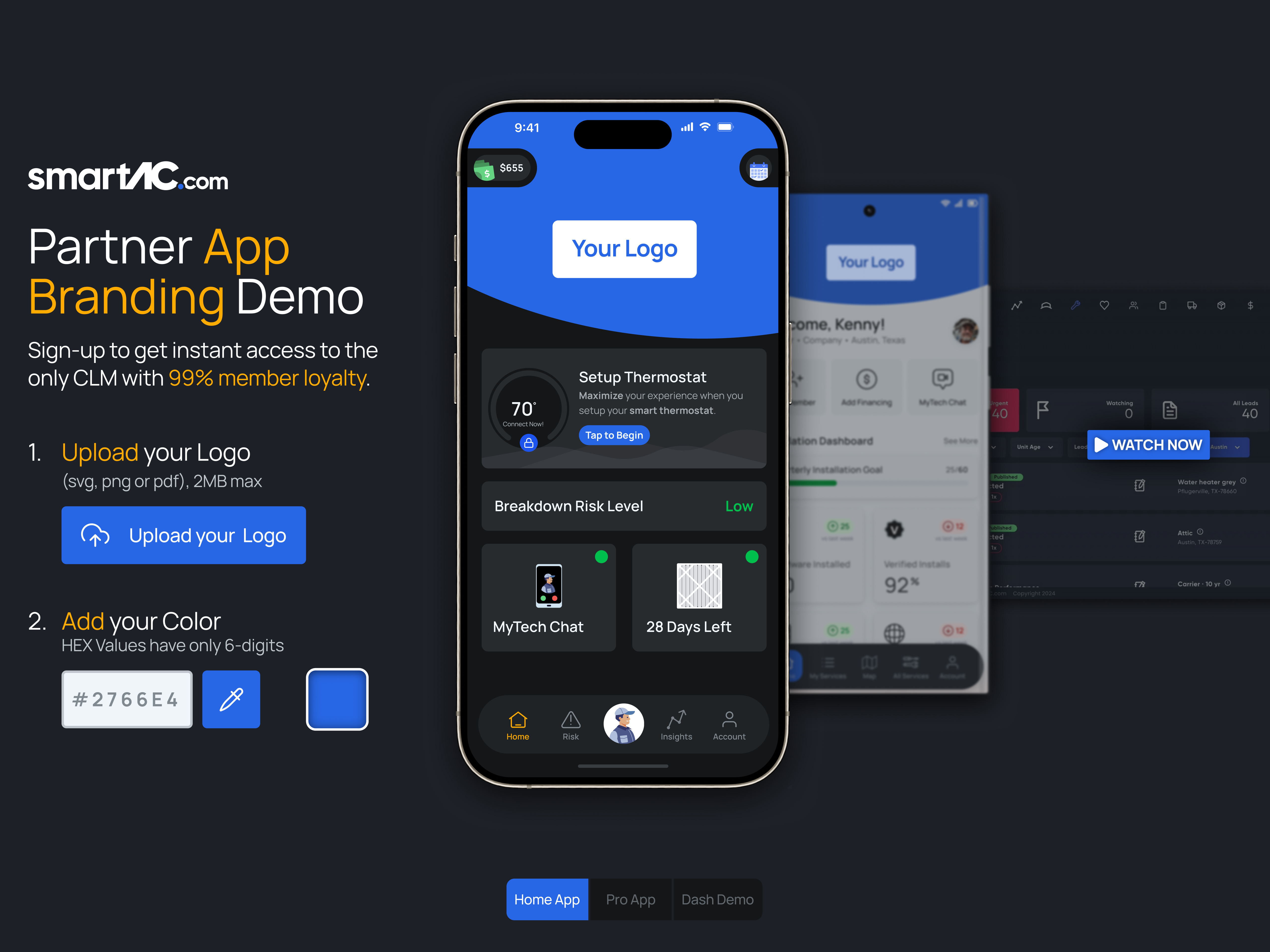
Putting the partner's brand right in the pocket of all their customers is a big piece of SmartAC's allure. Tie in all of the amazing features that SmartAC offers with monitoring, detection, performance and one-tap contact, we discovered it was a big selling point for a small investment on the development side.
Show. Don't tell. Rather than just have simple images, I used the work I had done on our corporate component & design system, then developed a real-time formula that allows for the mapping of a company's primary color seamlessly to the various parts of the interface.
More than just a logo in the app, I extracted the HUE of the provided color, then applied it to the HSL values of our interface. Though the shift is subtle, it helps create cohesion through the platforms buttons, cards, and user elements. All tinged with the slightest touch of the partner's brand color.
Use the slider to reveal
Final Design
Lots of other stuff went into the final design, such as focusing on testimonial videos with CTAS, including links to explainer videos on how the different facets of the 15-minute install worked, and what our final page-bottom CTA was to drive partners. Luckily, throughout testing users continued to respond positively, requiring no changes during the process. Our final design worked well at its key-goal: courting service partner customers and getting them excited. Success!