- Role
- Copywriter, Creative Director, Principal Designer
- Year
- 2025
- Client
- CLM, CRM, FSM
- Industry
- Customer Loyalty, Field Services, HVAC, Lead Management
- Team
- Skills
MyTech Multi-Platform Messaging
Field Service multi-platform video, chat & screen-share
Research
SmartAC's powerful suite of tools for field service partners, monitoring, alerts, and direct thermostat access, needed a serious communication boost. I personally took on the job to figure out and design MyTech, a fully integrated chat system seamlessly woven into the SmartAC platform. Way more than just a chat feature - this was a full communications platform with text, video chat, screen sharing, group discussions, and async video.
I dove deep into the world of chat, analyzing everything from the casual simplicity of WhatsApp to the professional power of LinkedIn. I explored every avenue – standalone apps, in-product integrations, even video calls – to find the perfect solution for SmartAC's specific needs. MyTech boasts text chat, notes, video, audio, screen sharing, and even group conversations.
MyTech's intuitive interface, the result of extensive research and a data-driven design process, dramatically streamlines workflows and significantly improves platform usability. The design isn't just pretty; it's practical, intuitive, and effective. I focused on making the experience seamless and enjoyable for the technicians, ultimately leading to a better experience for everyone involved.
SmartAC operates on a "trust but verify" model, and MyTech perfectly embodies this philosophy. It allows technicians to easily share crucial data alongside instant communication, fostering transparency and building trust with customers. This improved communication not only strengthens customer relationships but also unlocks valuable upselling opportunities.
MyTech tackled a major communication challenge head-on, resulting in improved communication, increased efficiency, and a demonstrably better customer experience for both SmartAC and their valued partners. It’s a win-win-win, and a project I’m incredibly proud of. It’s more than just a chat system - it's a complete communication platform.
Visuals
One of the biggest culprits behind sluggish UX and cognitive fatigue is what I call Box-in-Box Syndrome—the visual clutter that occurs when interfaces lean too heavily on layered panels, hard-edged containers, and modal stacks. It violates Hick’s Law by forcing users to scan and assess too many things at once, increasing cognitive load and decreasing decision-making speed.
To combat this, I used floating curved content areas and implied separation instead of overt box borders or dividers. The rounded modules create natural, breathable boundaries between functional zones—chat, controls, media, and notes—without boxing users into nested UIs. This reduces visual noise while preserving orientation. The soft 16px radius combined with smart spacing tricks the brain into intuitively grouping content, without forcing it to process layers of UI scaffolding.
The result is a layout that guides attention instead of demanding it.
Phase-Aware Ui: Designing with Intentional Transitions
Equally critical was understanding that this chat UI isn't static, the user interface transitions through phases as the user moves from one function to the next.
- Text Chat
- Video Call Initiation
- Live Video Chat
- Note-Taking During or After Call
- Post-Call Documentation and Review
Rather than jarring jumps between modes, I designed every phase to visually evolve from the last, allowing the user to naturally follow the story arc of the interaction.
Curved panels expand, action bars subtly reconfigure, and interface elements morph instead of being replaced. This ensures users always understand:
- What changed
- Why it changed
- What they can do now
- How it connects
- How to go back
No breadcrumbs needed. The shape and placement of elements do the guiding, teaching users to recognize where they are and why.
Directional UI: A Conversation with Structure
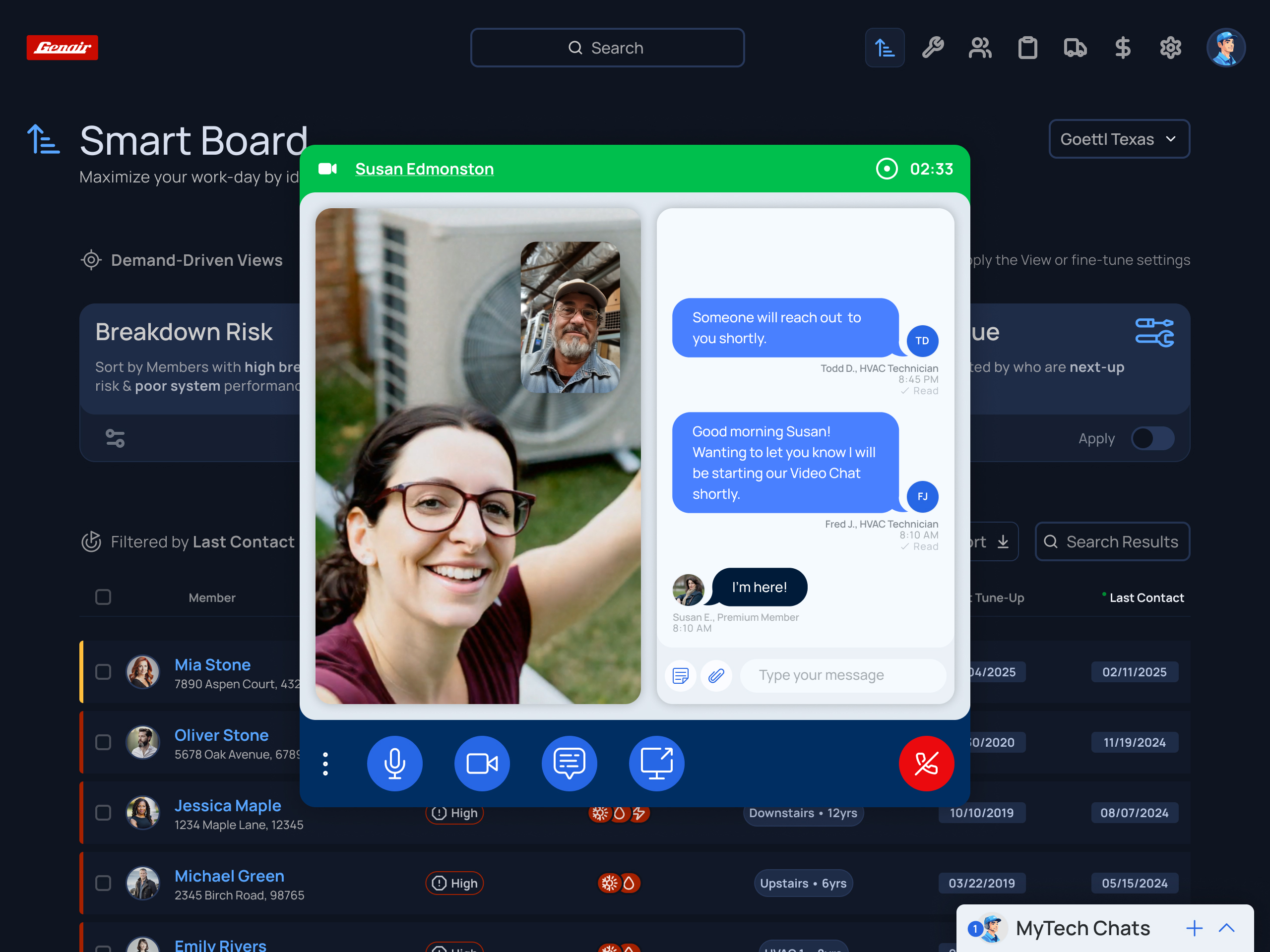
Each interface phase feels like a natural extension of the last. Video begins with a call status overlay, then gracefully yields to real-time chat and video side-by-side. When notes are added, they don’t hijack the screen, but expand within the context of the conversation.
This moves users through a purposefully staged interaction space that understands momentum, memory, and the way back.
This design doesn’t just look better. It feels smarter, moves smoother, and aligns with how people actually think through tasks: one goal, one moment at a time.
By removing hard-edged cognitive blockers and replacing them with transitions, spatial awareness, and curved flow, we prevent confusion, reduce bounce, and increase success. I built a conversation ecosystem that guides itself.
Onboarding
Great onboarding isn’t just about showing someone around, it’s about getting them to act, to understand, and to return. The best kind of onboarding isn’t a tooltip tour. It’s immersive action: letting users tap, drag, click, and interact directly with the real UI elements they’ll use day-to-day.
The Problem? Dev Time. True interactive onboarding, especially when layered on top of live UI elements, takes real engineering effort. It often competes for sprints against core functionality, bug fixes, or partner-driven priorities. So while it’s ideal, it’s not always feasible, at least not at launch. That’s where progressive, contextual onboarding enters.
Our Solution: Real Interface. Real Location. Real Learning
Instead of pulling users out into a separate "training mode," we layered onboarding directly onto the live product interface during each step of the walkthrough. This approach reduces friction, respects user time, and drives engagement without adding engineering overhead.
Train the eyes & the hands
- Explains function and behavior using crisp, scannable text
- Prepares the user for next steps, not just what’s visible now
- Floating callouts with directional tails lead attention exactly where it needs to go.
- CTAs like “Next: Add Notes” keep momentum moving.
- Anchors to the actual element the user will interact with
- Reinforces location memory so users know where to go later
- Priming the user for the icons, elements, and patterns they'll interact with
- Progress dots signal onboarding is structured, not endless.
Messaging
The final MyTech Messaging solution is a multi-modal, phase-aware communication system designed to match how real conversations unfold between technicians and members. Every feature lives in a single, continuous interface that transitions as needed. All without forcing users to hop between tools or views.
Notes + Chat: Side-by-Side, Not Hidden
Team notes don’t live in a separate system. They appear alongside the conversation, giving technicians real-time access to service history, system context, and teammate insights—all while actively chatting. This ensures continuity and allows for accurate follow-ups or asynchronous team handoffs.
What starts as a simple chat can grow into a full diagnostic session, where Technicians or Partner representatives can interact how their members deserve. When screen sharing, the technician isn’t just showing a generic browser—they’re guiding the member through their actual SmartAC Dashboard.
- Begin with standard chat messaging
- Open private team notes in-line, without leaving the thread
- Address and contact details
- Thermostat zones and current sensor readings
- Instantly escalate to a live video chat
- Screen sharing to walk Members through their accounts
- System alerts and past notes
- Subscription and hardware status
Each transition happens in-place. No reloads. No tool-switching. Just progressive depth as the conversation requires it. Keeping users engaged during the conversation, never having to lose focus or shift attention away from the customer. And because this happens alongside the active chat thread and notes panel, there’s never a loss of orientation or context.
Results
Across the board, the results confirmed we’d made the right decisions: technicians moved faster, members felt more supported, and overall understood benefits improved significantly.
User feedback played a critical role in validating the final MyTech Messaging experience. Throughout the project, we conducted multiple rounds of usability testing with real technicians and members, using live prototypes and staged interactions to capture authentic behavior. We followed that with structured user surveys and targeted A/B tests that compared MyTech against legacy tools!
The numbers told the story clearly: 91% of users preferred MyTech over the previous messaging tools, citing clarity, ease of use, and integrated workflows as standout benefits. Among existing customers, approval of the communication experience rose by 83%. And from a brand perspective, SmartAC saw a 38% increase in positive sentiment among members after using MyTech, marking a measurable shift in how the service and support experience was perceived. These outcomes weren’t abstract, they were directly tied to the design, structure, and flow of the MyTech system we delivered.