- Role
- Creative Director, Design Direction, Product Design
- Year
- 2019 to 2021
- Client
- Enterprise, Home Sales, Homebuilding
- Industry
- New Homes, Real Estate
- Team
- Skills
HomLuv
A Pinterest-style inspiration board that turns loved images into matched, purchasable new homes
Overview
HomLuv is a new-home discovery product in the BDX / NewHomeSource family1 that treats house-hunting like a mood board: shoppers "love" images of real listed homes, room by room, and the product turns those loves into a match percentage against real inventory. Over roughly eighteen months my team ran three rounds of user testing, moderated sessions in November 2020 and April 2021 and a larger unmoderated round in March 2022, refining onboarding, the matching mechanic and the path from browsing to contacting a builder.3713 [NEEDS Q: Rocksauce or EX Squared? The three testing decks carry Rocksauce branding through Q1 2022,25 and design pages dated April to June 2022 are left off this page,26 but BDX was also the parent of EX Squared, which bought Rocksauce. Confirm the HomLuv design work through March 2022 was Rocksauce's.]
Problem
Shoppers researching a new home were splitting their process across tools that did not talk to each other: Pinterest and Houzz for inspiration, builder sites and listing search for actual inventory. Testers said as much unprompted. "Having all of this on one site is very helpful. You can't do this on Pinterest," one said of the combined board;4 another, comparing it to a listings site, said "I don't think this is similar to Realtor.com. This seems like I can share a login with my husband."14 The business problem, turning inspiration browsing into a builder lead, is visible in the product's own core interactions: a "Get Info" action and a "Make an Offer" popup that "lets users send a pricing inquiry to a builder, based on the content from their own board."5 No sourced material states a revenue, traffic or conversion target for HomLuv. [NEEDS Q: was there one?]
Users & research
We tested two personas throughout: "New Home Shoppers" actively looking to buy, and "Inspiration Seekers" who dream about a future home on sites like Pinterest and HGTV. Earlier research also indicated the product appealed more to women than men.6
Round 1: November 2020, moderated, 6 testers. Two researchers ran six one-hour desktop sessions over Google Meet against a Figma prototype, three of each persona, average age 39.2 The core onboarding bet, asking users to pick a path and build a board around it, held up completely: 6 of 6 appreciated the path-based onboarding and trusted that creating a board would help them get started, and 6 of 6 reacted positively to exploring a home through its individual spaces rather than as a single listing.7 Deferring the sign-up prompt until after five loves also worked: 5 of 6 said they would sign up right at that point, and the one holdout only wanted to keep loving images uninterrupted.7
The same round surfaced real friction. The board's purpose "was not clearly spelled out" and meant different things to different testers; one assumed the Explore feed let you "frankenstein" a house together from unrelated rooms; two did not connect the heart icon to saving an image to a board on their own.8 The clearest fix came from a live iteration: after testers kept stumbling on the board's topic-editing control, a plain-language "Topics" label went in before the next session, and that tester "knew exactly how to add and edit Topics."9 [NEEDS Q: the report's author writes "I added". Was that you, or the researcher running the sessions?] "Make an Offer" also drew specific criticism: one tester expected a purely financial action and said he would rather talk to someone first; another found the popup "visually overwhelming" for a decision that size.10
Round 2: April 2021, moderated, 5 to 6 testers. With the path-based flow validated, testing shifted to the matching mechanic: a left-hand sidebar that translated loved images into a live match percentage. This was the round where the product's central promise landed hardest: 5 of 5 testers said they would use the tested version of HomLuv and replace the tools they currently used for home-buying search.11 5 of 5 understood the relationship between preferences, loved images and loved homes in the new sidebar; 6 of 6 understood why they were asked for preferences through a short quiz sequence (size and budget, features, availability and timeline, location) and kept going until every preference was set.12 One tester summed up the difference unprompted: "I wish I had that instead of doing searches on my own... Really refreshing."15
Round 3: March 2022, unmoderated, 9 testers. This round changed the method on purpose: nine testers recruited through UserInterviews.com ran the product alone, without a moderator, on five tasks (search from the homepage, love images, set up an account, set the budget, explore the map).13 Unmoderated testing at this larger size is what surfaced friction the smaller moderated rounds had not: 6 of 9 said they would use HomLuv for their current home research, citing the design, the match score and photo quality,13 but 5 of 9 said one of the hardest parts of the session was finding the budget quiz the first time, even though they finished it quickly once they did;13 the detail slide puts the initial-difficulty count at 4 of 9.16 Similarly, 5 of 9 could not connect their own actions to the left-hand sidebar until after they had finished a task, and 4 of 9 asked for more guidance, saying they could sense more depth in the product than they were finding on their own.1317
On the map, 8 of 9 correctly identified their top match and compared it favorably to competing home-search sites, but 4 of 9 tried to use a "cities in area" prompt to navigate the map because they could not find another way back out of it.18 Two testers, independently, described the product as feeling like it had matching intelligence built in: "This is a very powerful tool [but] there is a learning curve here," said one; "well organized, guided and [seemed to have] some machine-learning and artificial intelligence built-in... a really smart concept," said another.19
Approach & trade-offs
Path-based onboarding over a single generic flow. We could have opened with one universal search-and-browse experience. Instead we forced an early choice before showing anything else. The round 1 data settled this (6 of 6 positive), but it meant accepting an extra decision screen before any content, a real cost for a product trying to hook Inspiration Seekers who arrive with no urgency to choose.7
A soft, delayed sign-up gate over an upfront one. Most testers assumed the homepage's "Get Started" button led straight into sign-up; we deliberately did not do that, letting users explore and love images first and gating account creation behind five loves. That mismatch between expectation and reality tested as "a positive surprise" rather than a bait-and-switch, and 5 of 6 said they would have signed up at that exact moment anyway.720 The rejected alternative, asking for an account immediately, was what users expected and, per the same data, less effective.
A guided mascot with an escape hatch, not a mandatory tutorial. The Luvbird mascot split opinion sharply: one tester said it brings life and "delight" to the experience, while another was "not a fan," mainly because "he doesn't like guided popups," and felt the bird only earned its place once, prompting sign-in.21 Rather than removing it or forcing it on everyone, we kept the popups skippable: some of the personality payoff for enthusiastic users, traded for not blocking task completion for skeptical ones.
Solution
What we designed and tested across the three rounds, shown here from the design file my team locked for each development sprint, with pages dated from Q4 2020 to December 16, 2021:23
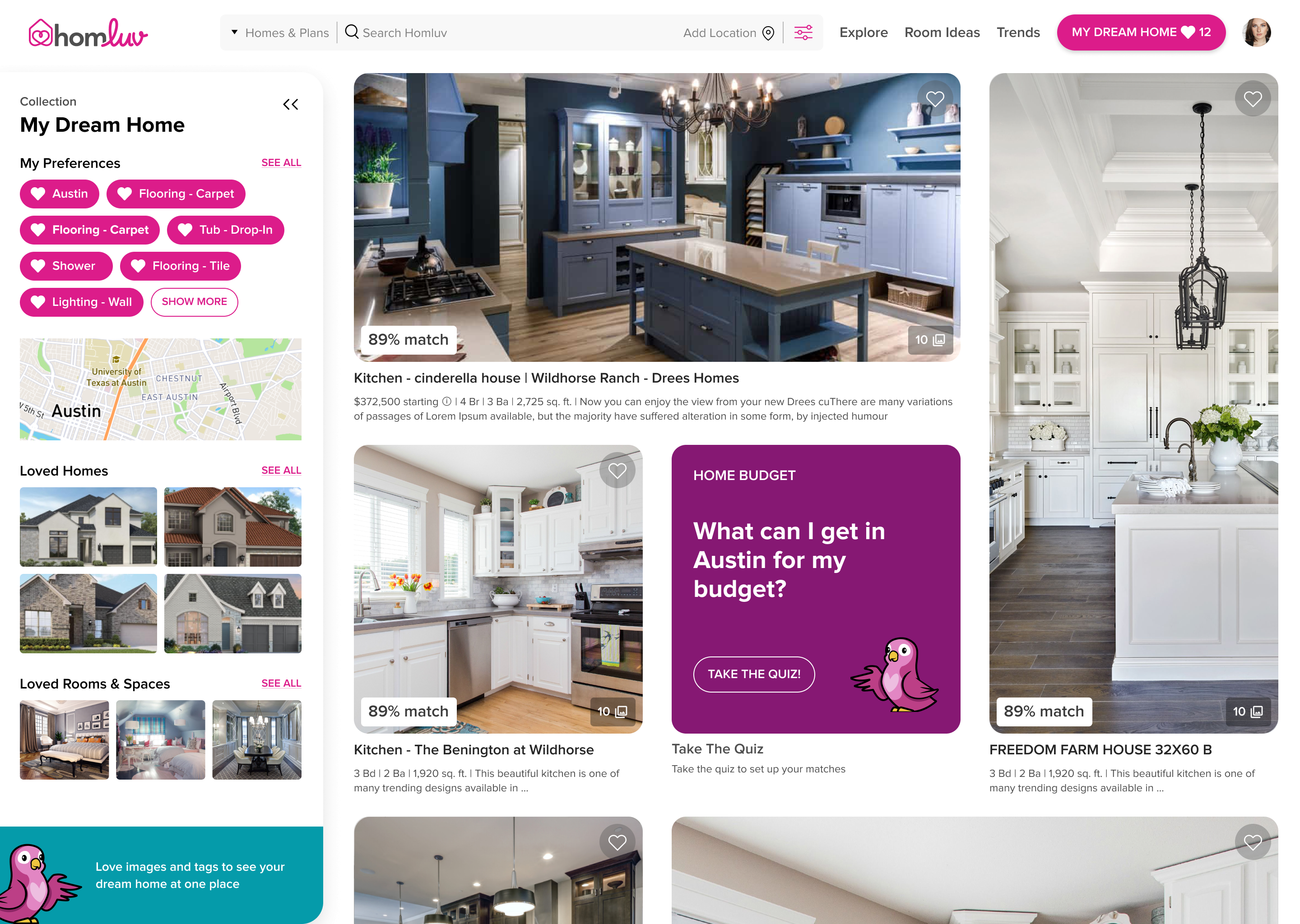
A path-based first-run flow that creates a first board, and an Explore feed of real listed-home images, tagged by room and style, that users love one at a time.7 A persistent left-hand sidebar holds the board's preferences, loved homes and loved rooms, and every photo carries a live match percentage driven by those loves and a short preference-quiz sequence (size and budget, features, timeline, location).12
Opening a photo shows which floor plan the room belongs to, the match score, and the features in the photo as tags the shopper can love individually, which is how the product learns a preference more specific than "I like this kitchen."712
A home details page connects the board back to a builder, with Ask a Question, Call Builder and Request an Appointment beside the plan. The builder, plan and prices shown are sample content in a mock-up, not live figures.23
A map-based search shows communities as match-percentage markers, with a location quiz asking where in the metro the shopper wants to live. This is the feature 8 of 9 round 3 testers used to find their top match, and the one 4 of 9 struggled to exit.18
Round 2 flagged mobile as an open opportunity because the tests ran on desktop only.24 The locked designs cover the responsive range, with frames at 320, 375, 414, 768, 1024, 1280, 1440 and 1920 pixels wide.24 [NEEDS Q: was the mobile experience ever tested?]
By May 2021 the home page promise had been rewritten around the mechanic the tests validated: "Save Pictures, Get Matches, Find Your Home," with a city search in place of the generic Get Started button.23
Results
No sourced business outcome exists for HomLuv: no launch date, traffic figure or conversion number appears in the materials available. [NEEDS Q: any numbers?] What is sourced is the research trajectory itself. The share of testers willing to adopt HomLuv rose from "5 of 6 would sign up at this point" (November 2020) to "5 of 5 would replace their current tools" (April 2021),711 before a harder, unmoderated round with nine testers surfaced discoverability and guidance gaps the smaller moderated rounds had missed: 6 of 9 still said they would use it, but 5 of 9 struggled to find the budget quiz and 4 of 9 wanted more guidance.13 The team's stated next steps answer those findings directly: educational prompts to help users uncover features on their own, an explicit way to navigate back out of the location quiz, and a budget quiz available without logging in first.22
What I'd do differently
The clearest lesson across these three rounds is a methods lesson, not a design one. The moderated sessions in 2020 and 2021 validated the core mechanic convincingly, but a moderator sitting alongside a tester will unintentionally paper over exactly the kind of friction ("where's the quiz," "how do I get back out of this") that only showed up once nine people were left alone with the product in March 2022. I would move to unmoderated testing earlier, even with fewer testers, specifically for navigation and discoverability questions, and reserve moderated sessions for concept and reaction testing, where a researcher's follow-up questions add real value.