- Role
- Creative Director, Design Direction, Product Design
- Year
- 2020
- Client
- Enterprise, Home Sales, Homebuilding, Saas
- Industry
- New Homes, Real Estate
- Team
- Skills
Envision EDC Style
A visualizer-first online design studio for new-home buyers, designed for the Envision options platform and tested with five buyers
Overview
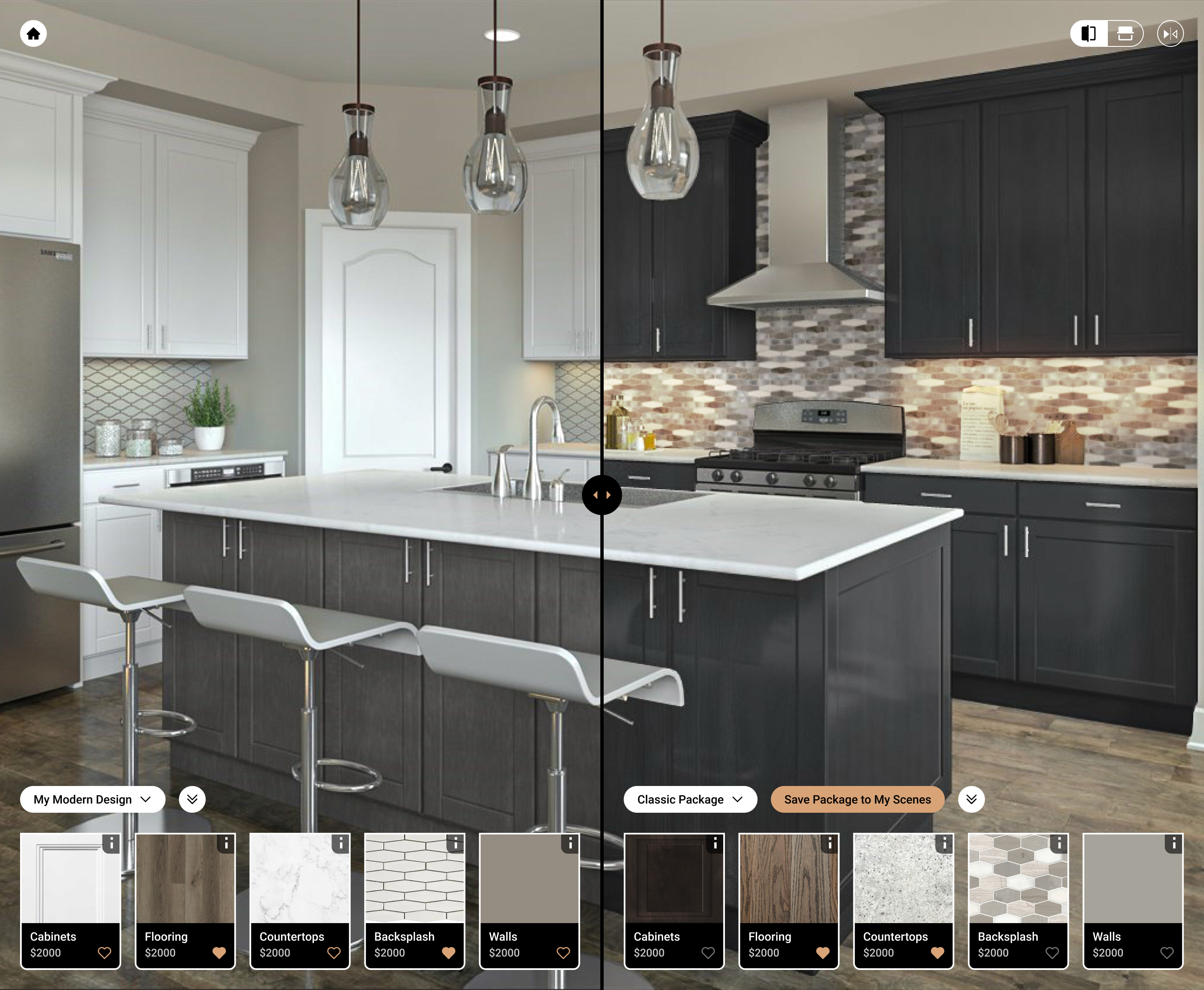
Envision is a homebuilder options platform; its full buyer-facing design center is what the files call the EDC [NEEDS Q: confirm EDC stands for Envision Design Center].24 My team designed "EDC Style", a visualizer-focused Envision experience that sits between a slim room visualizer and the data-heavy full EDC: a design studio home page, a room visualizer with packages and swatches, a mood board, a two-scene compare view, saved scenarios and confirmed options, in light and dark themes.45 We tested it with five homebuyers in spring 2021; three said they would use it, one said maybe and one said no, and nobody found the compare view or the selection summary unaided.6 [NEEDS Q: Rocksauce or EX Squared? The testing deck and the competitive analysis carry the Rocksauce name and dates of March and April 2021,7 and no Envision file mentions EX Squared. The product, though, belongs to the same group that owned EX Squared. Confirm this was Rocksauce work.]
Problem
The executive review deck states it plainly: there was a gap between a slim visualizer experience and the data-heavy EDC, builders wanted to start the buyer journey with immersive visuals, competitors had the front end but lacked the technology and integrations, and time to market was critical.4 [NEEDS Q: the deck reads as the product owner's argument. Did my team write it, design it, or both?]
The same deck draws the scope as a Venn diagram. The visualizer-focused product keeps room visualizer, visualizer categories, wishlist, confirmed options, user account and builder branding, adds mood board, visual compare and light and dark themes, and leaves designer collections, non-visualizer categories, design articles and the dashboard to the full EDC.5
Users & research
Competitive analysis, April 2021. We compared EDC Style feature by feature with Roomored. Roomored's 3D tour gave better angles but felt like a tour rather than an options selector, dropped users into rooms without transitions, and gave no way to compare options directly.8 EDC Style's landing page showed at once which rooms existed and how many options were picked, and its slider compared two scenarios.8 The analysis also turned on our own work: the mood board toggle was small and easy to miss, and it asked whether a buyer could start from a package and then edit on top of it.8
Usability test, five buyers. Five people buying now or soon, each in a 45 minute one-on-one session plus a questionnaire, inside the 5 March to 9 April 2021 testing window.9 The prototype started on a sample builder's virtual design studio, entered the gourmet kitchen, changed cabinets, then moved through selection summary, hearting, mood board, compare, My Scenarios and Confirmed Options.10
What held up. All five found the Choose Package dropdown easily, all understood that a swatch changes the image and what hearting does, and the swatch tray did not feel in the way.11 Three of five liked compare and said they would use it.6
What did not. None of five knew how to reach compare view, none knew how to reach the selection summary (and the term itself confused them), and one of five knew to click the photo to leave compare.6 Nobody used the drag handle unprompted, and three wanted a true side-by-side.12 All five misread the footstep and 360 camera icons.13 Nobody knew My Scenarios lived on the home page.14 They rated the product 3.8 out of 5.6
Approach & trade-offs
Visualizer first, data second. The scope decision was to cut, not add: keep what a buyer touches while picturing a room and hand the long tail of categories to the full EDC through a "View All Design Choices" button.515
Slider compare or side by side. We built a draggable split with vertical, horizontal and flip controls. The comp analysis liked it against a competitor with no compare at all;8 testers did not discover the drag and found the toggles neutral at best.12 The recommendation was to keep compare, make it findable, add a first-use hint, and keep iterating.16
Configurable per builder. Home pages were drawn for two to six or more rooms, with a customizable lower area, and the same studio was skinned for several builder brands.17 [NEEDS Q: Toll Brothers, M/I Homes and Tri Pointe appear as configurability samples, and a separate page audits K. Hovnanian's design studio site.18 Were any of these real Envision customers? I have named none as a client.]
Solution
The UI file also holds My Scenarios, Confirmed Options, search results and an option details modal marked complete, a prototype built for an executive board review, and a prototype for a "Consortium" day.19 [NEEDS Q: what was the Consortium: BHI's builder members?] A companion design system file covers colors, typography, icons, client logos, atoms and desktop molecules.20 A later file, "EDC Full", carries the visualizer UI update into the full EDC.21
Results
No adoption numbers exist in the files. [NEEDS Q: did Phase 1 reach beta builders, and what happened?] The test produced a short, specific list: label unfamiliar icons, give swatch details easy access from both views, define jargon such as scenario and scene, make compare easy to find, move the selection summary somewhere obvious, and animate the drag handle on first use.16 The updated prototype page in the UI file includes a "Show Selection Summary" state and a room menu with saved scenes.22
What I'd do differently
We hid the two features the exec deck sold hardest, compare and mood board, behind a save menu and a small toggle, and then learned in testing that zero of five could find one of them.6 I would run a five-person findability test on the navigation before polishing either view. I would also drop the vertical, horizontal and flip controls until someone asked for them.12