- Role
- Brand & Identity, Design Direction, Product Design
- Year
- 2014 to 17
- Client
- Startup
- Industry
- MarTech / Advertising, Retail
- Team
- Skills
Dosh Merchant Headless Portal
Content authoring for financial services
Research
No self-serve authoring
Dosh linked a shopper's credit and debit cards; cash back appeared automatically when they shopped at a participating merchant, no coupons, no redemption steps. None of that worked without the surface behind it: the merchant portal, where a business authored the offers that populated the app, and where our team reviewed each one before it went live. The merchant-facing spec did not exist until September 2016, more than two years after the consumer product and its rewards mechanic were already designed.
Before the portal, an offer meant a phone call, a spreadsheet, and someone on our side typing it in. The spec is explicit that a merchant's default posture was skepticism, not enthusiasm: a card-linked cash-back program asks a business to pay for customers who might have walked in anyway. Four audiences shared one system: merchant owners with full navigation and billing visibility, merchant staff with a narrower "create offers only" role, our internal review team working a separate admin portal, and consumers who never logged in at all, their transaction and social data resold back to the merchant as Customer Insights.
Whiteboard sessions, filed alongside the early research: mapping the consumer flow and the audiences a merchant-facing portal would need to serve.
What we looked at
While scoping the dashboard and account screens, we collected reference screenshots from Domo, Swipely, Womply, Zipmark, and Mint. Domo's card-per-metric layout is the clearest echo in what shipped: total sales, visits, and shares each got their own tile, the same shape Domo used for cash balance and ticket volume. Mint's cash-flow-by-merchant view, spending broken out by actual store name, was the closest precedent for turning raw transactions into the merchant-readable line Customer Insights became.
Rep-assisted signup
One onboarding path never appears in the spec at all: a field rep filling out signup on the merchant's behalf. A note on the wireframe explains why: too often a rep typed the owner's email address wrong, and the owner never received their credentials, so the flow needed its own email-verification step (note on the wireframe, Nov 2016). A second note ties the same channel to commission credit, tracking which sales agent or organization referred a given merchant so they could be credited properly (note on the wireframe, Nov 2016). Neither the spec nor the earlier build documents this path.
Why analytics mattered
The requirements framed Customer Insights not as a nice-to-have widget but as one of four backend pillars alongside offer creation, the dashboard, and social activity: demographic and social data "to determine demographics of users who are buying at merchant locations."
"these are the consumers in x amount radius to your store... if they set up a campaign, we will send an email to customers in your area that fit this criteria" (note on the wireframe, Nov 2016)
The coupon mechanic was the hook; the data it generated was the actual product a skeptical owner was being sold.
Logic and stories
Information architecture
The spec's navigation structure became the IA: Dashboard, Offers, Social Activity, Customer Insights, and a persistent "Create Offer" action available from any screen rather than a peer nav item. Every top-level item survived into the 2017 production screens, with "Promotions" renamed to "Offers" along the way.
Three stories that shaped the build
- As a merchant, I want to create an offer without waiting on Dosh staff, satisfied by the Create Offer flow: basic info, images, targeting, review, publish.
- As a merchant with multiple stores, I want to add every location once and apply an offer to a subset of them, satisfied by Locations with bulk upload and a per-offer location picker.
- As a merchant, I want to understand who is actually buying, satisfied by Customer Insights: age, gender, marital status, zip.
A canvas note next to the IA sketch: "Create Offer" floats free of the nav, reachable from anywhere, because it's the one action every merchant persona needs on every screen.
Content model before form
We designed the content model before the form: an offer is a type, an amount, minimums, locations, dates, an image, and a set of targeting rules, and every one of those fields existed in the September 2016 spec before a single pixel of the Create Offer screen was drawn. The model came first, the rules on top of it second, and the review-and-publish workflow last, in that order.
Every offer also needed a category, drawn from an 85-row taxonomy across nine top-level groups; two rows still carried open notes about what a merchant could type in themselves versus what needed manual review before it reached a shopper.
Targeting had its own unit economics behind it. A scratch note beside the wireframe works through lifetime value against cost of acquisition for a real, small local audience, roughly 250 consumers within a radius of one store, the pool Advanced Targeting was actually built to reach (note on the wireframe, Nov 2016). A "campaign" at this stage meant an email to whichever of those 250 matched the merchant's criteria: a small, costed audience, not a marginal-cost feature, which is the same logic behind the upgrade gate on Customer Segment Targeting.
Flows
Create Offer, step by step
The flow follows the September 2016 spec in order: choose an offer type, set the discount amount and minimum spend, write or pick a description, set campaign dates, choose locations, upload a header image, set targeting, review, and publish with an e-signature. Discount amount was bounded 15 to 50 percent in 5-point steps; campaign dates started at least 10 business days out and ran a minimum of three months. Once published, an offer is not editable; the header flips to In Review, then Live.
The review step shows the merchant real math before they publish: for a $30 purchase at a 15 percent discount, the review page works out a $7.05 estimated acquisition cost per customer, the discount plus a redemption fee, before the merchant clicks Confirm & Publish. Tooltips were specified for every field, triggered on hover, because the vocabulary, cashback versus redemption fee versus estimated target count, was not vocabulary a small-business owner could be assumed to already know.
The rules layer
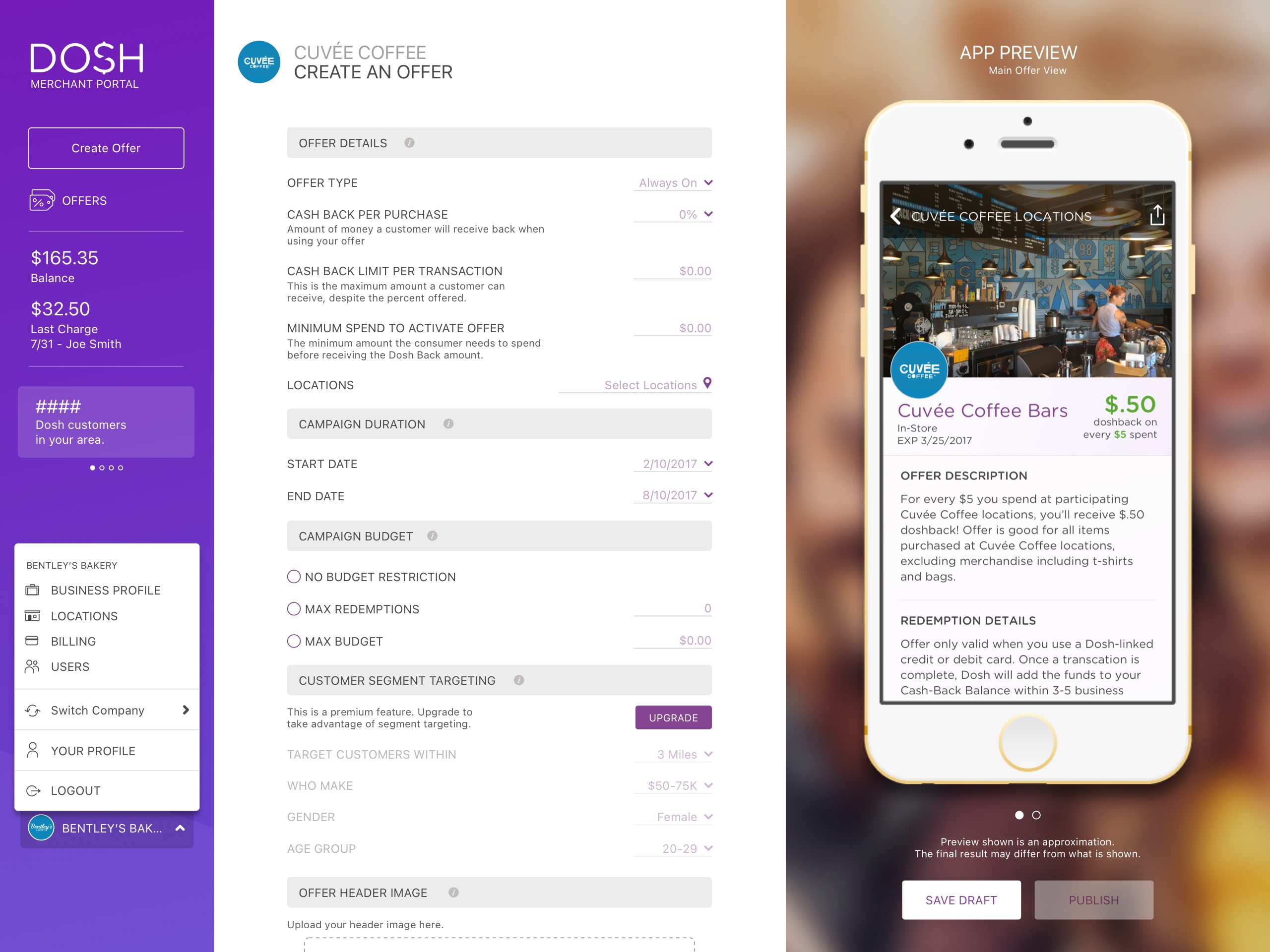
Offers needed real scheduling and loyalty logic, not just a discount: time-of-day windows, recurrence, day-of-week targeting, and a buy-X-get-Y loyalty lever that grew from a basic "buy X get X off next visit" line in the spec into a structured "BUY 1 GET 10% OFF" control by 2017. One targeting decision is visible directly in the shipped UI: Customer Segment Targeting, radius, income band, gender, age group, is fully built in every 2017 production screen, but greyed out under a "PREMIUM FEATURE, UPGRADE TO ACCESS" banner. That's the more expensive design decision of the two: cutting a feature removes it outright, gating it means every non-subscribing merchant sees exactly what they're missing every time they build an offer.
The upgrade gate: a note on the wireframe reading 'grey it out...upgrade and pay the $19.99 per month' ships field-for-field, behind an UPGRADE button.
The wireframe shows this was designed, not discovered in production: "For the advanced targeting section we should show this and grey it out if someone buys the pay as you go version. Have some copy available as to why they should upgrade and pay the $19.99 per month" (note on the wireframe, Nov 2016). The $19.99 figure ties to the Subscription plan in the White-label section: the wireframe's paywall and the spec's pricing model are the same gate.
The rules layer in practice: a loyalty offer's buy-X-get-Y controls, March 2017, built on the same targeting and scheduling logic as the gated Advanced Targeting panel above.
The great thing about the UX to final cycle is realizing all of the things you thought you knew that you didn't. We had to continually iterate and roll out new features based on real-world sales info coming from the Dosh team as they spoke to potential clients.
Iterations
Twelve dated screenshot snapshots track the portal's production screens from October 2016 through June 2017, the Create Offer form moving from a single long form to modular, collapsible sections with its own budget and targeting controls.
Signup: choosing a plan
Pricing-tier signup: the abstract plan concept ships as concrete Basic/Silver/Gold cards, plus a live-audience map the wireframe never proposed.
The abstract "pick a plan" wireframe became concrete Basic, Silver, and Gold cards, plus a live audience-size map the wireframe never proposed, showing a merchant how many nearby shoppers their plan would actually reach.
What never shipped
MID collection: a note on the wireframe reading 'We MUST collect a MID at this point' still has no shipped match.
A note on the wireframe says plainly: "This page will prepopulate with the merchants data that they used upon sign up. We MUST collect a MID at this point" (note on the wireframe, Nov 2016). The shipped 2017 signup form has no MID field, and the review step that follows carries the Business Information block forward with no MID line either.
A second note asks for a clone button: "when merchant clicks on view offer a sample preview will appear. Please make a clone button available in upper right hand corner" (note on the wireframe, Nov 2016). The shipped Offers List has Live/Scheduled/Drafts/Complete tabs and a CSV export, but no clone action. Both of these are the kind of thing that falls away as real sales conversations reprioritize the roadmap: we had to continually iterate and roll out new features based on real-world info coming from the Dosh team as they spoke to potential clients, and the MID field and the clone button lost out to that.
Marketing Overview is a different story. It wasn't diminished in the final product, it was a major reason the product exists. Dosh suddenly exposed all of this amazing aggregated, anonymized, real-world buyer information to merchants, with real-time updates, giving them insights they'd never had before for this type of campaign. So the Marketing Overview screen itself stayed exactly as designed, Nov 2016 wireframe and July 2017 production screen the same 1440x1024 canvas, because its job was already done. The real value moved into that live buyer intelligence, not into redesigning this particular print-and-download flow.
Create Offer across three of the twelve dated snapshots: October 2016's offer-type picker, February 2017's single scrolling form, June 2017's modular sectioned layout with its own budget and targeting controls.
Multi-location merchants
Locations became their own object rather than a single field on the merchant record: per-location merchant IDs, bulk Excel upload for a retailer with dozens of stores, and an explicit choice inside Create Offer of all locations or a selected subset. The Add Locations screen itself iterates visibly across the dated snapshots, from a flat address form in January 2017 to a full address-validation round trip by March, entering an address, requesting validation, and seeing a suggested match before it could be saved.
Parallel working copies
Nineteen archived working files show at least five separate updates landing in the four weeks after the Nov 2016 wireframe pass alone. We kept one shared master file and reviewed each contributor's copy against it on a regular cadence before anything moved into production.
White-label
A developer job aid for the underlying platform was the reference the client handed us: login credentials come from "Navigator enrollment," the onboarding walkthrough is Navigator's own "Quick Start" guide relabeled, and the fee schedule points to a separate Navigator document. We planned for the portal to be white-labeled around that reference. That need never materialized while the product was in our hands, at least not that I'm aware of. It may have come up after the product left our hands, but I can't say. What we shipped was designed as its own product: the offer content model, targeting rules, the review-and-publish workflow, analytics, and the admin moderation queue, plus every pixel of the visual brand, built fresh for Dosh even with Navigator as the starting reference point.
Billing, either way
Final design
Dashboard
The dashboard's widget set carries through with no notes needed to explain it, though production adds whole new widget rows the wireframe never sketched.
The dashboard's total-sales, visits, and shares metrics map directly onto the spec's KPI list, and production added Marketing ROI and Top Influencers cards the wireframe never proposed.
Customer Insights
Customer Insights turns age, gender, marital status, and zip into merchant-facing charts. It was scoped as one of four required backend pillars from the spec's first draft, not a feature that had to earn its place later: the coupon mechanic was the hook, and this screen was the reason a skeptical owner kept using the rest of the portal.
This is the same point as the Marketing Overview screen: this is where that live, aggregated, anonymized buyer intelligence merchants never had before actually lived for them.
Review, before anything reaches a shopper
Every uploaded offer image passed through an internal review queue before it could go live: a merchant list flagged Active, Suspended, or Needs Review, and an approve/reject step for each flagged image, added after a July 2017 client meeting raised the need to revisit rejected images rather than just discard them. A separate Featured Banners screen extended the same moderation model to the merchant-facing home feed, a ranked list of offers per visibility tier, each tied to a live preview of the exact consumer-app card a shopper would see. Marketing Overview, a proposed print-and-download flow for in-store signage, stayed on the drawing board the whole time; the 2017 production screen is visually identical to the Nov 2016 wireframe.
Shipped to engineering
Dev handoff was not a claim, it was a folder: 306 exported icon and button slices for the merchant portal specifically, dated February 27, 2017.
The shipped portal
Here is where all of it landed: the six core merchant screens and the two admin screens that reviewed what merchants published, all in their final, filled-in state. This is the portal a merchant actually used, and the queue our team actually worked.
The shipped merchant portal, July 2017: Dashboard, Create Offer, Offers List, Customer Insights, Social Activity, and Manage Locations.
The admin side of the same system: our internal merchant list and offer-review queue, the gate every offer passed through before a shopper ever saw it.
Results
An honest note
No usage or adoption data for the merchant portal survives: no merchant counts, no redemption numbers, no revenue figures, no A/B results. What exists instead is a spec full of KPI field definitions and investor-deck financial projections, neither of which is a measured result. What follows is real, but it is process and outcome data, not portal-usage metrics, and it is labeled as such.
These are markers of process and scope, not usage: how long the build ran, how many snapshots and parallel files survive, and the one company-level outcome on record, Dosh's 2021 acquisition by Cardlytics, which says nothing about how the portal itself performed.
What shipped
Considering the success of the project and where things went, there's not a thing I would change about how we handled things.